
Just the files, please
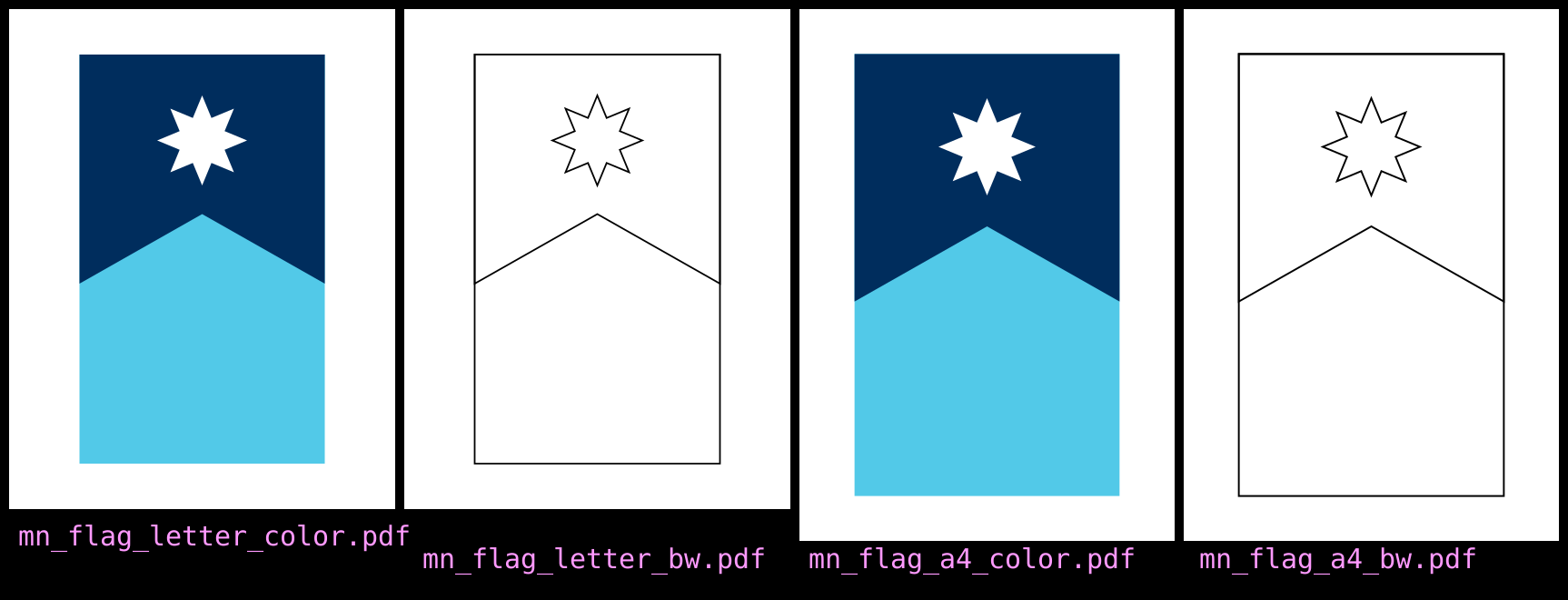
In this post, I will explain how to make a PostScript version of the Minnesota state flag, both full-color and black-and-white line-art versions, suitable for printing. If you don't care about the code and just want the printable files, skip to the end of the post.
What is Minnesota?
A few months ago, I was watching the game show Jeopardy!. It was
the Double Jeopardy! round, and the contestant asked Ken Jennings
for
It is a contest
for $800.
The clue was:
Andrew Prekker said the North Star was his focus in designing the winning contest entry that's now this state's flag
As Ken read the clue, the following image appeared on the screen:

The correct response, of course, was What is Minnesota?
It's been two years since Minnesota adopted this flag, replacing the previous
seal on a bedsheet
style design commonly used for U.S. state flags, which
is decried by vexillologists. I happen to love our new flag. Two years ago,
I explained how to make an
SVG version of flag can be written in just sixteen lines of code:
<svg viewBox="0 0 500 300" xmlns='http://www.w3.org/2000/svg'>
  <rect x="0" y="0" width="500" height="300" stroke="none" fill="#52c9e8" />
  <polygon points="0,0 280,0 195,150 280,300 0,300"
    stroke="none" fill="#002d5d" />
  <polyline points="
    160.00000000,150.00000000
    66.10912703,188.89087297
    105.00000000,95.00000000
    143.89087297,188.89087297
    50.00000000,150.00000000
    143.89087297,111.10912703
    105.00000000,205.00000000
    66.10912703,111.10912703
    160.00000000,150.00000000"
    stroke="none" fill="white" />
</svg>
I want to color
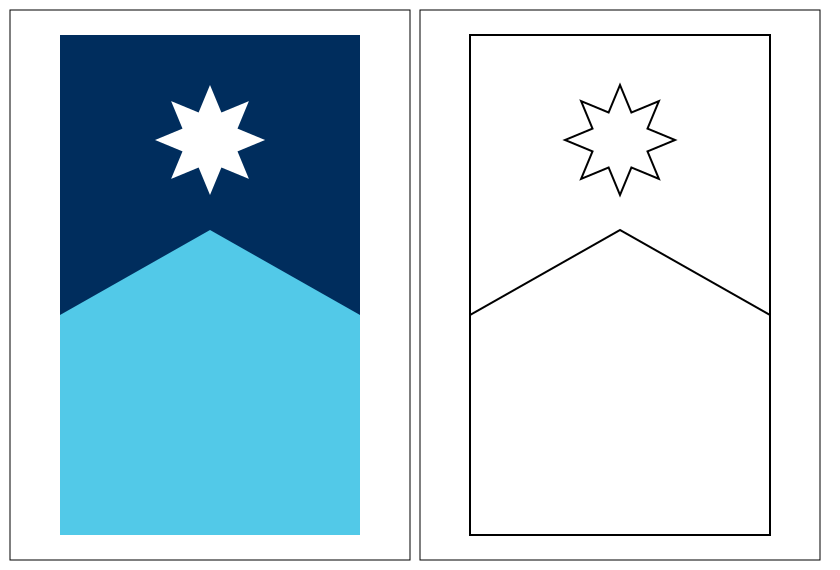
At this moment, I do not have a color printer. I have a black-and-white laser printer that works better than any color inkjet printer I've ever had (except, of course, that it can't print in color). I wanted to a line-art version of the flag which I could print out and color by hand.
Since I wanted something intended to print, I decided to recreate the Minnesota flag using PostScript, a computer language designed for printers (and the basis for PDF). PostScript isn't just a file format for describing printed documents, but a Turing complete programming language capable of handling loops and recursion. I previously used PostScript to make a (pseudo)random maze-like thing.
My goal is to create a file which can be easily customized to choose between a color and line-art version of the flag, as well as adjust the paper size or margins.
Three fun things about PostScript
-
PostScript is stack-based, much like WebAssembly. You push values on the stack and then push a command. For example, in
1 3 add:1pushes the number 1 onto the stack3pushes the number 3 onto the stackaddtakes the top two numbers on the stack (1 and 3), adds them, and then pushes the result (4) onto the stack.
-
PostScript's coordinate system is different than SVG's. In SVG (and many computer graphics systems), the origin is in the upper-left corner of the image, the first coordinate increases from left-to-right, and the second coordinate increases from top-to-bottom. In PostScript1, the origin is in the lower-left corner of the page, the first coordinate increases from left-to-right, and the second coordinate increases from bottom-to-top. As a mathematician, PostScript's convention makes more sense to me, but it does mean we can't just use the coordinates from our SVG file.
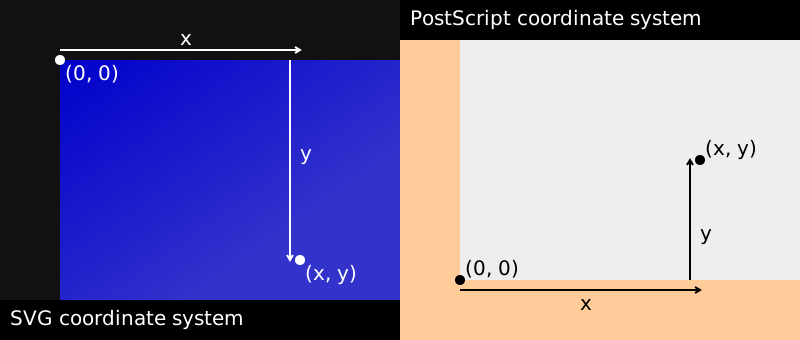
Figure 2. The coordinate systems for SVG and PostScript -
The units in PostScript are points. There are 72 points in an inch.
The configuration section
The first part of our PostScript file will be the "configuration section", which the user can easily edit to configure the file. There are four values we want to offer for configuration:
- The width of the page
- The height of the page
- The minimum width of the border
- Whether the page is in color or line art
We start the file as follows:
%!ps

%%%%%%%%%%%%%%%%%%%%%%%%
% Configuration section
%%%%%%%%%%%%%%%%%%%%%%%%

% Length values are given in points
% 1 inch = 72 points

/width
  % paper width
  8.5 72 mul
def

/height
  % paper height
  11 72 mul
def

/min_border
  % minimum border width
  1 72 mul
def

/fill_with_color
  % change to true for full-color, false for line-art
  true
def

%%%%%%%%%%%%%%%%% Do not edit below this line %%%%%%%%%%%%%%%%%%
A few things to note here:
- Anything in a line after a
%is ignored by the computer. - Whitespace is ignored. Lines 10–13 are equivalent to
/width 8.5 72 mul def. - In Lines 10–13:
/widthpushes the undefined variablewidthonto the stack.8.5 72push the values 8.5 and 11 onto the stack.multakes the top two values (8.5 and 11) off the stack, multiplies them, and pushes the product (93.5) onto the stack.deftakes the top two values (widthand 93.5) off the stack, and then assigns the value 93.5 to the variablewidth.
Here is the JavaScript analogue to lines 1–30:
/***********************
 * Configuration section
 ***********************/

// Length values are given in points
// 1 inch = 72 points

// paper width
const width = 8.5 * 72

// paper height
const height = 11 * 72

// minimum border width
const minBorder = 1 * 72

// change to true for full-color, false for line-art
const fillWithColor = true

/************** Do not edit below this line *****************/
Determine flag dimensions
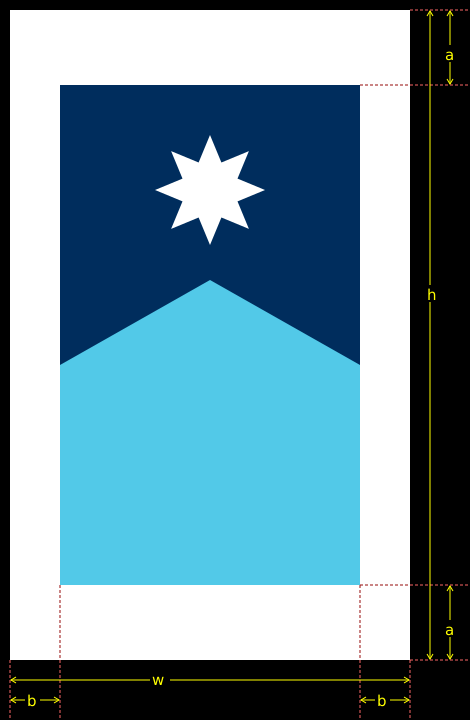
Some notation: Let
and be the vertical and horizontal border widths,
respectively, and \(m = \min(a, b)\).
The ratio of the height to the length of the Minnesota flag (hung vertically) is
5:3. Let \(n = w - 2b\) be the width of the flag. Then the height of
the flag is \(5n/3 = h - 2a\). Note that \(m = a\) or \(m = b\).
In our code, \(h\), \(w\), and \(b\) are called width, height, and
min_border.
We will use flag_width and flag_height to denote the width (\(n\)) and
height of the flag, respectively, as well as vborder and hborder for \(a\)
and \(b\), respectively.
In the case where \(m = a\), we could use this code:
/vborder min_border def
/flag_height height min_border 2 mul sub def
/flag_width flag_height 3 5 div mul def
/hborder height flag_height sub 2 div def
Note that \(b \leq m\) in this case, i.e. the expression hborder min_border lt evaluates to false.
On the other hand, in the case where \(m = b\), we could use this code instead:
/hborder min_border def
/flag_width width min_border 2 mul sub def
/flag_height flag_width 5 3 div mul def
/vborder height flag_height sub 2 div def
We combine these with a conditional in the actual file:
2 setlinewidth % thicker lines

% determine borders

% foo_a is foo when vborder = min_border
/flag_height_a height min_border 2 mul sub def
/flag_width_a flag_height_a 3 5 div mul def
/hborder_a width flag_width_a sub 2 div def

hborder_a min_border lt {
    min_border %hborder
    width min_border 2 mul sub % flag_width
    dup 5 3 div mul % flag_height
    dup height exch sub 2 div %vborder
}{
    hborder_a
    flag_width_a
    flag_height_a
    min_border % vborder
} ifelse

/vborder exch def
/flag_height exch def
/flag_width exch def
/hborder exch def
In lines 35–38, we compute the flag_height_a, flag_width_a and
hborder_a, which are the height of the flag, width of the flag, and the size
of the horizontal border, respectively, under the assumption that \(m = a\).
Lines 40–50 are a conditional. In general bool_val { [foo] }{ [bar] } ifelse will execute [foo] if bool_val is true, and execute [bar]
otherwise. In our case:
-
If
hborder_ais less thanmin_border(which means we can't use the values found in lines 35–38), we do the following:Line PostScript Effect Stack afterwards 41 min_borderPush min_borderonto stackm 42 widthPush widthonto stackm, n 42 min_borderPush min_borderonto stackm, n, m 42 2Push 2onto stackm, n, m, 2 42 mulRemove the last two items from the stack, multiply them, and push the product onto the stack m, n, 2 × m 42 subRemove the last two items from the stack, subtract the last item from the second-to-last item, and push the difference onto the stack m, n - 2 × m 43 dupDuplicate the last item m, n - 2 × m, n - 2 × m 43 5Push 5onto the stackm, n - 2 × m, n - 2 × m, 5 43 3Push 3onto the stackm, n - 2 × m, n - 2 × m, 5, 3 43 divRemove the last two items from the stack, divide the second-to-last item by the last item, and push the quotient onto the stack m, n - 2 × m, n - 2 × m, 5/3 43 mulRemove the last two items from the stack, multiply them, and push the product onto the stack m, n - 2 × m, 5 × (n - 2 × m)/3 44 dupDuplicate the last item m, n - 2 × m, 5 × (n - 2 × m)/3, 5 × (n - 2 × m)/3 44 heightPush heightonto the stackm, n - 2 × m, 5 × (n - 2 × m)/3, 5 × (n - 2 × m)/3, h 44 exchSwap the positions of the last two items on the stack m, n - 2 × m, 5 × (n - 2 × m)/3, h, 5 × (n - 2 × m)/3 44 subRemove the last two items from the stack, subtract the last item from the second-to-last item, and push the difference onto the stack m, n - 2 × m, 5 × (n - 2 × m)/3, h - 5 × (n - 2 × m)/3 44 2Push 2onto stackm, n - 2 × m, 5 × (n - 2 × m)/3, h - 5 × (n - 2 × m)/3, 2 44 divRemove the last two items from the stack, divide the second-to-last item by the last item, and push the quotient onto the stack m, n - 2 × m, 5 × (n - 2 × m)/3, (h - 5 × (n - 2 × m)/3)/ 2 Then we would execute lines 52–55:
Line PostScript Effect Stack afterwards vborderflag_heightflag_widthhborder52 /vborderPush the undefined variable vborderonto the stackm, n - 2 × m, 5 × (n - 2 × m)/3, (h - 5 × (n - 2 × m)/3)/ 2, vborderundefined undefined undefined undefined 52 exchSwap the positions of the last two items on the stack m, n - 2 × m, 5 × (n - 2 × m)/3, vborder, (h - 5 × (n - 2 × m)/3)/ 2undefined undefined undefined undefined 52 defRemove the last two items from the stack, and assign the last item to the second-to-last item m, n - 2 × m, 5 × (n - 2 × m)/3 (h - 5 × (n - 2 × m)/3)/ 2 undefined undefined undefined 53 /flag_heightPush the undefined variable flag_heightonto the stackm, n - 2 × m, 5 × (n - 2 × m)/3, flag_height(h - 5 × (n - 2 × m)/3)/ 2 undefined undefined undefined 53 exchSwap the positions of the last two items on the stack m, n - 2 × m, flag_height, 5 × (n - 2 × m)/3(h - 5 × (n - 2 × m)/3)/ 2 undefined undefined undefined 53 defRemove the last two items from the stack, and assign the last item to the second-to-last item m, n - 2 × m (h - 5 × (n - 2 × m)/3)/ 2 5 × (n - 2 × m)/3 undefined undefined 54 /flag_widthPush the undefined variable flag_widthonto the stackm, n - 2 × m, flag_widthh - 5 × (n - 2 × m)/3)/ 2 5 × (n - 2 × m)/3 undefined undefined 54 exchSwap the positions of the last two items on the stack m, flag_width, n - 2 × m(h - 5 × (n - 2 × m)/3)/ 2 5 × (n - 2 × m)/3 undefined undefined 54 defRemove the last two items from the stack, and assign the last item to the second-to-last item m (h - 5 × (n - 2 × m)/3)/ 2 5 × (n - 2 × m)/3 n - 2 × m undefined 55 /hborderPush the undefined variable hborderonto the stackm, hborder(h - 5 × (n - 2 × m)/3)/ 2 5 × (n - 2 × m)/3 n - 2 × m undefined 55 exchSwap the positions of the last two items on the stack hborder, m(h - 5 × (n - 2 × m)/3)/ 2 5 × (n - 2 × m)/3 n - 2 × m undefined 55 defRemove the last two items from the stack, and assign the last item to the second-to-last item (empty) (h - 5 × (n - 2 × m)/3)/ 2 5 × (n - 2 × m)/3 n - 2 × m m -
On the other hand, if
hborder_ais not less thanmin_border, we go ahead and use the values found in lines 36–38. Lines 46-49 pushhborder_a,flag_width_a,flag_height_aandmin_borderonto the stack, and then lines 50-55 assign these tohborder,flag_width,flag_height,vborder, respectively. (Because of the way the stack works, these are in the opposite order.)
Lines 30-55 are analogous to this JavaScript:
setLineWidth(2) // thicker lines

// determine borders

let vBorder = minBorder
let flagHeight = height - 2 * minBorder
let flagWidth = flagHeight * 3/5
let hBorder = (width - flagWidth)/2

if (hBorderA < minBorder) {
  hBorder = minBorder
  flagWidth = 2 * width - minBorder
  flagHeight = flagWidth * 5/3
  vBorder = (height - flagHeight)/2
}
Where is everything?
It is now time to start putting things on the paper. The Minnesota flag consists of three parts:
- A water blue rectangle
- A night-sky blue pentagon
- A white eight-pointed star
In the 2024 SVG post, I described these in detail and gave some coordinates in terms of , the width of the flag. (Back then, this was the height, because we had the flag in landscape orientation.)
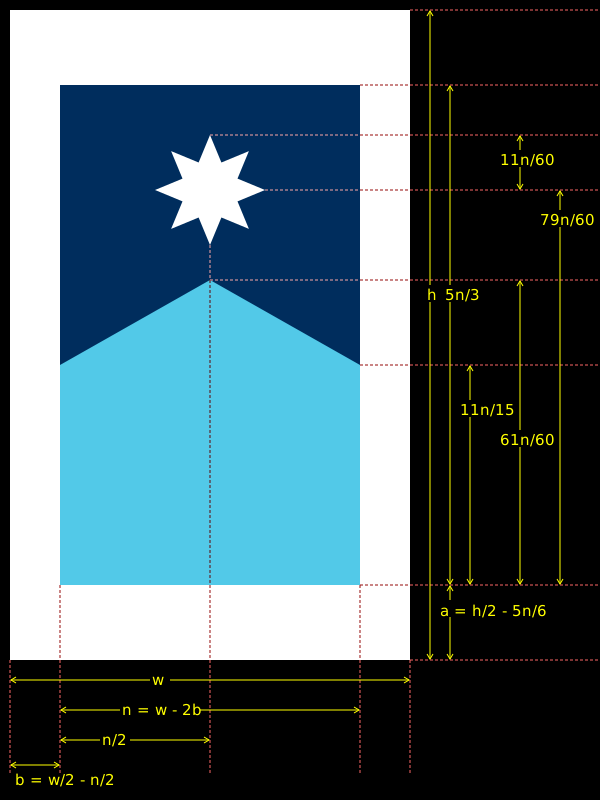
For our PostScript, we have to do some adjustments, since the coordinate system is based on the lower-left corner rather than the upper-left corner. The following diagram shows all the dimensions based on :
The rectangle
The sky-blue rectangle is the easiest thing to add. First, we set the color based on whether we are making the full-color version or the line-art version:
% water blue rectangle
fill_with_color {
  16#52 255 div
  16#C9 255 div
  16#E8 255 div
  setrgbcolor
}{
  0 setgray
} ifelse
This is another conditional. The prefix 16# in front of a number indicates
that it's written in hexadecimal. If fill_with_color is true,
we push 0x52 / 255, 0xc9 / 255, and 0xe8 / 255 onto the stack,
and then call the setrgbcolor
procedure, setting the color to #52c9e8. On the other
hand, if fill_with_color is false, the color is set to black.
The next bit actually draws the shape:
newpath
  hborder vborder moveto
  0 flag_height rlineto
  flag_width 0 rlineto
  0 flag_height neg rlineto
  closepath
fill_with_color { fill }{ stroke } ifelse
Here is a breakdown of what these statements do:
| Line | Statement | Effect | Resulting position |
|---|---|---|---|
| 67 | newpath |
Starts a new path | |
| 68 | hborder vborder moveto |
Move to the position (b, a) | (b, a) |
| 69 | 0 flag_height rlineto |
Move up flag_height \(= 5n/3\) units, drawing a line as we go |
(b, a + 5n/3) |
| 70 | flag_width 0 rlineto |
Move right flag_width \(= n\) units, drawing a line as we go |
(b + n, a + 5n/3) |
| 71 | 0 flag_height neg rlineto |
Move down flag_height \(= 5n/3\) units, drawing a line as we go |
(b + n, a) |
| 72 | closepath |
Move to the initial point, drawing a line as we go | (b, a) |
| 73 | fill_with_color { fill }{ stroke } ifelse |
If fill_with_color is true, fill the shape with the current color. Otherwise, draw the outline of the shape in the current color. |
The night-sky blue pentagon
We begin by defining some variables for our convenience later:
% night sky blue pentagon

/pentagon_outer_y vborder flag_width 11 15 div mul add def
/pentagon_indent 17 60 div flag_width mul def
This sets pentagon_outer_y to \(a + \tfrac{11}{15}n\) and pentagon_indent
to \(\tfrac{17}{60} n\).
fill_with_color {
  0
  16#2D 255 div
  16#5D 255 div
  setrgbcolor
}{
  0 setgray
} ifelse
This is similar lines 57–65 above. If fill_with_color is true, the
color
is set to #002d5d; otherwise, it is set to black.
Next, we draw the shape:
newpath
  hborder pentagon_outer_y moveto
  flag_width 2 div pentagon_indent rlineto
  flag_width 2 div pentagon_indent neg rlineto
  hborder flag_width add vborder flag_height add lineto
  flag_width neg 0 rlineto
  closepath
fill_with_color { fill }{ stroke } ifelse
Here's what's going on:
| Line | Statement | Effect | Resulting position |
|---|---|---|---|
| 89 | newpath |
Starts a new path | |
| 90 | hborder pentagon_outer_y moveto |
Move to the position (b, a + 11 n / 15) | (b, a + 11 n / 15) |
| 91 | flag_width 2 div pentagon_indent rlineto |
Move right \(n/2\) units and up \(17n/60\) units, drawing a line as we go | (b + n/2, a + 61 n / 60) |
| 92 | flag_width 2 div pentagon_indent neg rlineto |
Move right \(n/2\) units and down \(17n/60\) units, drawing a line as we go | (b + n, a + 11 n / 15) |
| 93 | hborder flag_width add vborder flag_height add lineto |
Move to the position (b + n, a + 5 n / 3), drawing a line as we go | (b + n, a + 5 n / 3) |
| 94 | flag_width neg 0 rlineto |
Move left \(n\) units, drawing a line as we go | (b, a + 5 n / 3) |
| 95 | closepath |
Move to the initial point, drawing a line as we go | (b, a + 11 n / 15) |
| 96 | fill_with_color { fill }{ stroke } ifelse |
If fill_with_color is true, fill the shape with the current color. Otherwise, draw the outline of the shape in the current color. |
The white star
It's now time to deal with the star. This is going to require some more math.
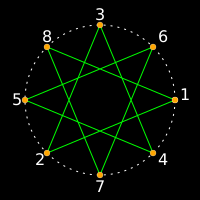
In my original version, the star was filled and the strokes used to make the star were suppressed. I made the star by considering 8 equally-spaced points around a circle, then connecting the th point to the \((j + 3)\)rd point. However, if we do this for the outline version, we will get all those unwanted inner lines.
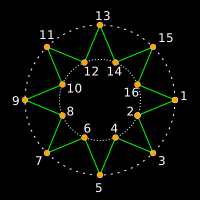
The inner corners are also equally-spaced along a circle with a smaller radius. Let's find the distance of the inner corners from the center of the star.
We start by re-coordinatizing the old star (from the SVG) at the origin, so that the outer circle points are at \[\{(r \cos (k \pi/4), r \sin (k \pi/4)): 0 \leq k < 8\},\] where \(r\) is the radius of the outer circle. We take two line segments of the star and find the intersection.
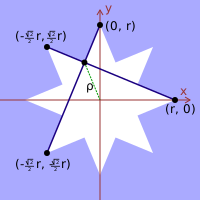
The equations for the lines are \(y = \left(1 + \sqrt{2}\right)x + r\) and \(y = \left(1- \sqrt{2}\right)x - \left(1 - \sqrt{2}\right)r\). The intersection is at \(\left(\left(1 - \sqrt{2}\right)r/2, r/2\right)\), and the distance from the intersection to the origin is \[\rho = \sqrt{\frac{2 - \sqrt{2}}{2}}r.\]
Now, recall that the distance from the center of the star to the outer points is \(r = 11n/60,\) where \(n\) is the width of the flag. Moreover, the center of the star has a distance of \(79n/60 + a\) from the bottom edge of the paper and a distance of \(n/2 + b\) from the right edge of the paper. (See Figure 4.)
Hence, we make the following definitions:
% white star
/star_outer_radius 11 60 div flag_width mul def
/star_inner_radius 2 2 sqrt sub 2 div sqrt star_outer_radius mul def
/star_center_x flag_width 2 div hborder add def
/star_center_y 79 60 div flag_width mul vborder add def
Next, we define two functions. Each takes one argument (an angle, in degrees2), and returns a pair of numbers as outputs:
/outer_star_point {
  1 dict begin
    /a exch def
    star_outer_radius a cos mul star_center_x add
    star_outer_radius a sin mul star_center_y add
  end
} def
/inner_star_point {
  1 dict begin
    /a exch def
    star_inner_radius a 22.5 add cos mul star_center_x add
    star_inner_radius a 22.5 add sin mul star_center_y add
  end
} def
Here is what happens when outer_star_point is called with a number
on the top of the stack:
| Line | PostScript | Effect | Stack afterwards |
|---|---|---|---|
| t (some number, given as an argument) | |||
| 104 | 1 dict begin |
Set up a new dictionary for local variables | t |
| 105 | /a |
Push the undefined variable a onto the stack |
t, a |
| 105 | exch |
Swap the positions of the last two items on the stack | a, t |
| 105 | def |
Remove the last two items from the stack, and assign the last item to the second-to-last item | |
| 106 | star_outer_radius |
Push star_outer_radius onto the stack |
r |
| 106 | a |
Push a onto the stack |
r, t |
| 106 | cos |
Remove the last item from the stack, find the cosine of that number, and push the result onto the stack | r, cos(t) |
| 106 | mul |
Remove the last two items from the stack, multiply them, and push the product onto the stack | r × cos(t) |
| 106 | star_center_x |
Push star_center_x onto the stack |
r × cos(t), n/2 + b |
| 106 | add |
Remove the last two items from the stack, add them, and push the sum onto the stack | r × cos(t) + n/2 + b |
| 107 | star_outer_radius |
Push star_outer_radius onto the stack |
r × cos(t) + n/2 + b, r |
| 107 | a |
Push a onto the stack |
r × cos(t) + n/2 + b, r, t |
| 107 | sin |
Remove the last item from the stack, find the sine of that number, and push the result onto the stack | r × cos(t) + n/2 + b, r, sin(t) |
| 107 | mul |
Remove the last two items from the stack, multiply them, and push the product onto the stack | r × cos(t) + n/2 + b, r × sin(t) |
| 107 | star_center_y |
Push star_center_y onto the stack |
r × cos(t) + n/2 + b, r × sin(t), 79n/60 + a |
| 107 | add |
Remove the last two items from the stack, add them, and push the sum onto the stack | r × cos(t) + n/2 + b, r × sin(t) + 79n/60 + a |
| 108 | end |
Stop using the new dictionary for local variables | r × cos(t) + n/2 + b, r × sin(t) + 79n/60 + a |
The end result is to leave \(r \cos(t) + n / 2 + b\) and \(r \sin(t) + 79n/60 + a\) on the top of the stack. Lines 103–116 are equivalent to this JavaScript:
function outerStarPoint(a) {
  return [
    starOuterRadius * Math.cos(a) + starCenterX,
    starOuterRadius * Math.sin(a) + starCenterY
  ]
}
function innerStarPoint(a) {
  return [
    starInnerRadius * Math.cos(a + 22.5) + starCenterX,
    starInnerRadius * Math.sin(a + 22.5) + starCenterY
  ]
}
Next we set the color to white if we are making a color version, and black if we are making the line art version:
fill_with_color {
    1 setgray
}{
    0 setgray
} ifelse
Now, we actually draw the star. We use a for loop. The syntax for a PostScript
for loop is start step end { [stuff] } for.
newpath
    0 1 8 {
        /k exch def
        k 45 mul outer_star_point k 0 eq { moveto }{ lineto } ifelse
        k 45 mul inner_star_point lineto
    } for
    closepath
fill_with_color { fill }{ stroke } ifelse
Here's what this code does:
| Line | PostScript | Effect | Stack afterwards |
|---|---|---|---|
| 124 | newpath |
Starts a new path | |
| 125 | 0 1 8 |
Push 0, 1, and 8 on the stack | 0, 1, 8 |
| 125–129 | { [lines 126–128] } |
Push the instructions on lines 126–128 onto the stack | 0, 1, 8, Instructions in lines 126–128 |
| 129 | for |
For each integer 0, 1, … 7, push that number onto the stack and then execute lines 126–128 | |
| 130 | closepath |
Move to the initial point, drawing a line as we go | |
| 131 | fill_with_color { fill }{ stroke } ifelse |
If fill_with_color is true, fill the shape with the color. If fill_with_color is false, draw the outline of the shape. |
Lines 126–128 are executed 7 times by the for loop:
| Line | PostScript | Effect | Stack afterwards |
|---|---|---|---|
t (an integer between 0 and 7, inclusive, pushed onto the stack by the for loop) |
|||
| 126 | /k |
Push the undefined variable k onto the stack |
t, k |
| 126 | exch |
Swap the positions of the last two items on the stack | k, t |
| 126 | def |
Remove the last two items from the stack, and assign the last item to the second-to-last item | |
| 127 | k 45 |
Push k and 45 onto the stack |
t, 45 |
| 127 | mul |
Remove the last two items from the stack, multiply them, and push the product onto the stack | 45 × t |
| 127 | outer_star_point |
Call outer_star_point (which will consume the last item on the stack) |
r cos(45t) + n/2 + b, r sin(45t) + 79n/60 + a |
| 127 | k 0 |
Push k and 0 onto the stack |
r cos(45t) + n/2 + b, r sin(45t) + 79n/60 + a, t, 0 |
| 127 | eq |
Remove the last two items from the stack, compare them, and push true onto the stack if the are equal, and false otherwise |
r cos(45t) + n/2 + b, r sin(45t) + 79n/60 + a, t = 0 |
| 127 | { moveto }{ lineto } ifelse |
Remove the last item from the stack. Move to the coordinates given by next two items on the stack, drawing a line if that item is false |
|
| 128 | k 45 |
Push k and 45 onto the stack |
t, 45 |
| 128 | mul |
Remove the last two items from the stack, multiply them, and push the product onto the stack | 45 × t |
| 128 | inner_star_point |
Call inner_star_point (which will consume the last item on the stack) |
ρ cos(45t + 22.5) + n/2 + b, ρ sin(45t + 22.5) + 79n/60 + a |
| 128 | lineto |
Draw a line to the coordinates given by the last two items on the stack |
Wrapping up the PostScript
The last thing to do is to tell PostScript to actually show or print everything:
showpage
Here is the complete PostScript file, in case you want to customize it:
mn_flag.ps
Creating PDFs
To create a PDF version, we will use the ps2pdf command in
GhostScript, an open-source
PostScript interpreter. Converting a PostScript file to PDF is fairly
straightforward3:
ps2pdf mn_flag.ps mn_flag_letter_color.pdf
Here is the resulting PDF: mn_flag_letter_color.pdf.
Next, let's make the black-and-white line-art version. We edit mn_flag.ps to
change the definition of fill_with_color to false:
/fill_with_color
  % change to true for full-color, false for line-art
  false
def
Then we use ps2pdf to make the PDF version:
ps2pdf mn_flag.ps mn_flag_letter_bw.pdf
Here is the resulting PDF: mn_flag_letter_bw.pdf.
Next, let's make the A4 versions. A4 paper, the standard stationery size for most
of the world, is 210 mm × 297 mm. An inch is exactly 25.4 mm, so this
adjustment to mn_flag.ps will do:
/width
  % paper width
  210 25.4 div 72 mul
def

/height
  % paper height
  297 25.4 div 72 mul
def

/min_border
  % minimum border width
  25 25.4 div 72 mul
def

/fill_with_color
  % change to true for full-color, false for line-art
  false
def
Then we use ps2pdf command with the -sPAPERSIZE=a4
switch
to convert to A4-sized PDF:
ps2pdf -sPAPERSIZE=a4 mn_flag.ps mn_flag_a4_bw.pdf
Here is the resulting PDF: mn_flag_a4_bw.pdf.
Finally, we make the color A4 version:
/width
  % paper width
  210 25.4 div 72 mul
def

/height
  % paper height
  297 25.4 div 72 mul
def

/min_border
  % minimum border width
  25 25.4 div 72 mul
def

/fill_with_color
  % change to true for full-color, false for line-art
  true
def
We use ps2pdf with -sPAPERSIZE=a4 switch again:
ps2pdf -sPAPERSIZE=a4 mn_flag.ps mn_flag_a4_color.pdf
Here is the resulting PDF: mn_flag_a4_color.pdf.
The resulting files
Here are the PDF files we created:
- Letter, color:
mn_flag_letter_color.pdf - Letter, black-and-white line-art
mn_flag_letter_bw.pdf - A4, color:
mn_flag_a4_color.pdf - A4, black-and-white line-art
mn_flag_a4_bw.pdf
Footnotes
-
There's actually multiple coordinate systems and the ability to define your own in PostScript, but I'm talking about the default one we will be using in this file. ↩
-
Unfortunately, the
sinandcosfunctions in PostScript take their argument in degrees, not radians. Kinda gross, I know. ↩ -
By default, GhostScript is configured to output to letter-sized (8.5 in × 11 in) paper, the standard stationery size in North America. If this has been changed on your system (e.g. so that the default size is A4), you need to add the
-sPAPERSIZE=letterswitch, as described below. ↩